
Ticket Details

Con't find an answer?

Need Assistance? Submit a Support Ticket

Submit a Support Ticket
Vinay Shukla
Vinay Shukla 17 Nov 2024
DTLive - Flutter App (Android - iOS - Website ) Movies - TV Series - Live TV - OTT - Admin Panel
Closed public

Q : I need Postman API collection

Hi, 
One of my friend is helping me customize the laravel backend and application for this project. He is asking me to share the Postman API Collection of this project, Can you please share it with me. I really need it.


Add Attachments .png  .jpg  .jpeg  .docx  .mp4  .mp3  .pdf  .zip  .sql
Replied (8) 1–5 of 8
Mr. Chirag
Mr. Chirag admin 02 Dec 2024, 5:09 AM

Hi,

Open project in VS Code or Android Studio and follow below steps :

1. Open terminal of VS Code or Android Studio

2. Run below commands one by one in terminal :

    - cd packages

    - cd chewie

    - flutter pub get

    - cd ..

    - cd vimeo

    - flutter pub get


our team member already share you explaination so why you not follow them ?


Regards, Mr. Chirag

Vinay Shukla
Vinay Shukla 19 Nov 2024, 1:14 PM

Hello,
Why dont you reply 

Have you checked my code 

I have already shared my server credentials in private.

Mr. Chirag
Mr. Chirag admin 18 Nov 2024, 7:40 AM

can you share your server access. please? this is not a source code error

there are some configuration issue...

you had setup admin panel in subdomain and webside is main domain..


pleaes share server access so we can configure and fixed it.. 

Regards, Mr. Chirag

Mr. Priyank
Mr. Priyank employee 18 Nov 2024, 12:08 AM

Hii Vinay,
Good Morning!

Can you share you control panel(admin panel) username & password ?
Also give firebase access to our support email : support@divinetechs.com

Thank you!

Regards, Mr. Priyank

Vinay Shukla
Vinay Shukla 17 Nov 2024, 3:02 PM

Hello, 
I have successfully solved the problems, thanks for your reply,
I have created the web version first to test the application. 
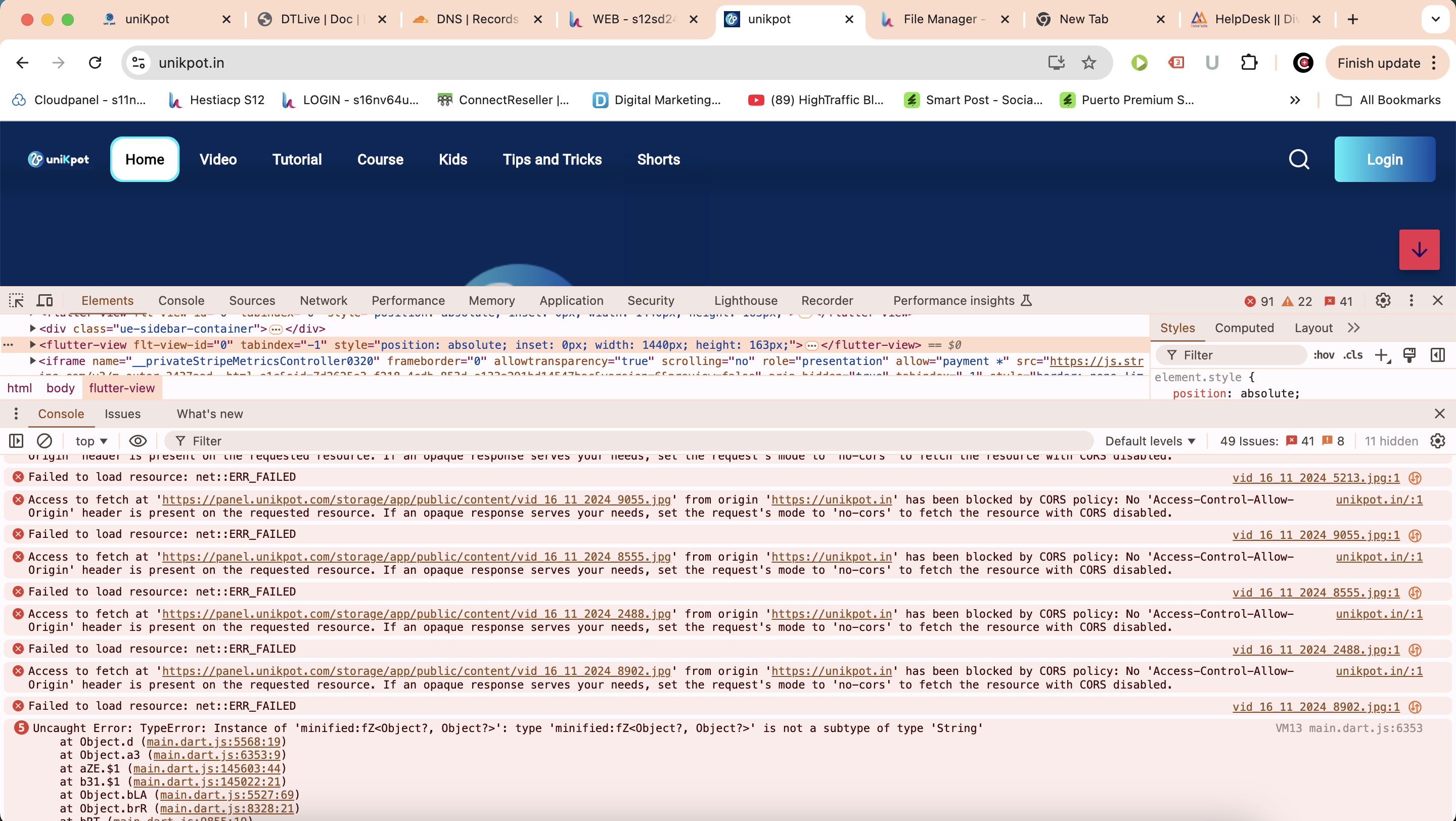
Configured all the firebase and notification settings of one signal and cloud messaging, released a we version following the tutorials, Here is my web version url, unikpot.in

My panel is at panel.unikpot.com

But in my web app the images are not loading due to cors policy, also the login is not working, not google login, not otp login, at web version, 
test numbers are 8969144388 otp 243275

I have configured the firebase login properly.

When i try to login with google or otp it says a green Hi there success message but the page doesnt navigate to anywhere, it stays at login page. 
is this due to cors policy error, 
Should i set my backend at panel.unikpot.in 
How to solve these errors, please help.

Thanks and regards.

Vinay

Showing 1–5 of 8 replies

Support is Online

Office hours

Monday – Friday
10:00 AM – 06:00 PM
IST (GMT +5:30)

Office time --:-- --
Your time --:-- --
Documentation

Explore Our Support Documentation

Whether you're troubleshooting an issue or looking for step-by-step guidance, our resources are designed to empower you with the knowledge you need

Back To Top