

Ticket Details

Q : Instalation Issue, – missing DB table & migration errors on VPS (cineflix.in)
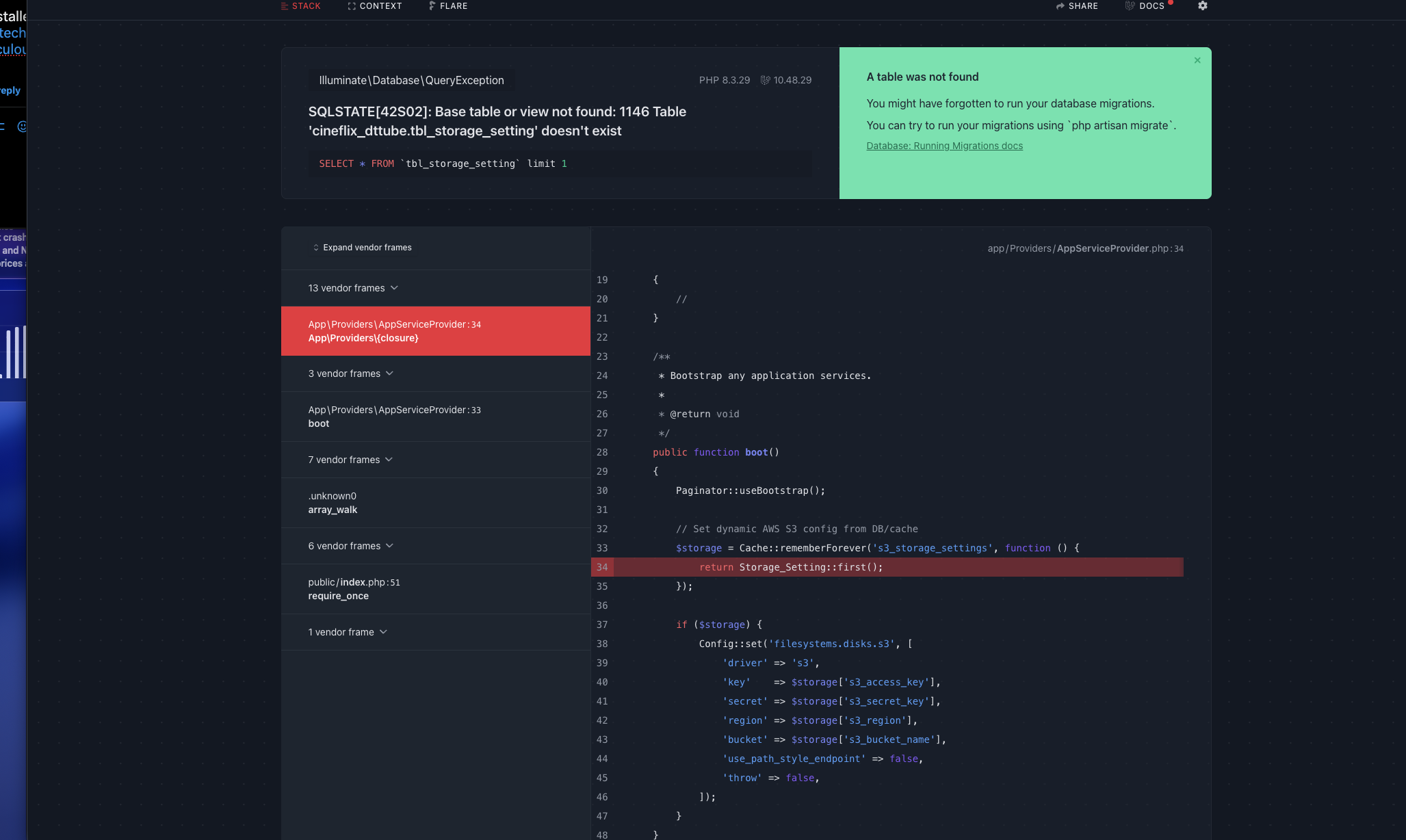
Hello Support Team, I am facing an issue while installing a Laravel-based codecanyon script on my VPS. VPS details: - Hostname: srv1235054.hstgr.cloud - Plan: KVM 4 - OS: AlmaLinux 9 with cPanel - Domain/Project path: /home/cineflix/public_html/admin - Admin URL: http://cineflix.in/admin/ Problem summary: - The application throws this error in the browser: SQLSTATE[42S02]: Base table or view not found: 1146 Table 'cineflix_dttube.tbl_storage_setting' doesn't exist - There is no .sql dump file in the codecanyon package, so I am trying to use Laravel migrations. - From SSH, I ran: cd /home/cineflix/public_html/admin php artisan migrate php artisan db:seed - Both commands fail with the same error because AppServiceProvider calls: Storage_Setting::first(); before the table is created. What I have already done: - Confirmed the project is in /home/cineflix/public_html/admin and artisan is present there. - Confirmed database connection is correct (DB: cineflix_dttube). - Edited app/Providers/AppServiceProvider.php to wrap the Storage_Setting::first() call in a Schema::hasTable('tbl_storage_setting') check, and also guarded it with try/catch, but migrations are still not completing due to the same missing table error. - I am able to connect as root via SSH to the VPS. Request: - Please: 1) Check why the Laravel migrations for this project are not able to create tbl_storage_setting (and other required tables), and 2) Either: - Fix the AppServiceProvider / configuration so that php artisan migrate and php artisan db:seed run successfully without trying to query a non-existing table during boot, or - Create the required tbl_storage_setting table and any related schema according to the script’s structure so that the app can run normally. If needed, you can: - Inspect /home/cineflix/public_html/admin/app/Providers/AppServiceProvider.php - Inspect database/migrations and database/seeders in the same project - Verify DB connection and run the necessary artisan commands. Goal: - I just need a working installation where http://cineflix.in/admin/ opens without SQL errors and I can log in to the admin panel. Thank you in advance for your help.
 30_12_2025_11_6953db5aa8414.png
png
30_12_2025_11_6953db5aa8414.png
png


Explore Our Support Documentation
Whether you're troubleshooting an issue or looking for step-by-step guidance, our resources are designed to empower you with the knowledge you need